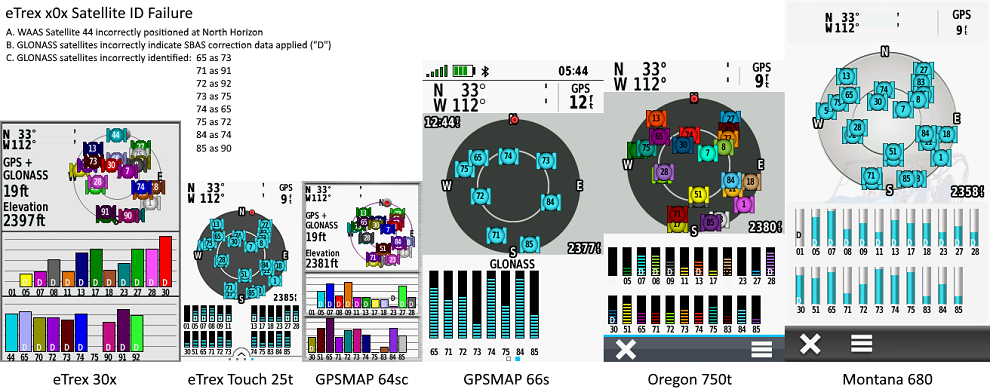
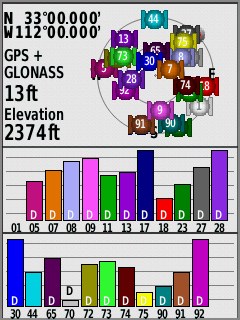

| 1. | Satellite Page incorrectly identifies GLONASS satellites. [example] | [240] [250] [260] [270] [280] [290] |
| 2. | Satellite Page incorrectly indicates SBAS correction data is being applied to GLONASS satellites. [example] | [240] [250] [260] [270] [280] [290] |
| 3. | Geocache Filters are not honored in Map Page display. | [240] [250] [260] [270] [280] [290] |
| 4. | Multiple users have reported they are unable to safely eject a microSD card installed in an eTrex x2x. [Gr] [81] | [250] [260] [270] [280] [290] |
| 5. | Keyboard language selection is not retained across power cycles. | [250] [260] [270] [280] [290] |
| 6. | The 'Back' button is non functional when prompted to select guidance method for route calculation. [Gr] | [270] [280] [290] |
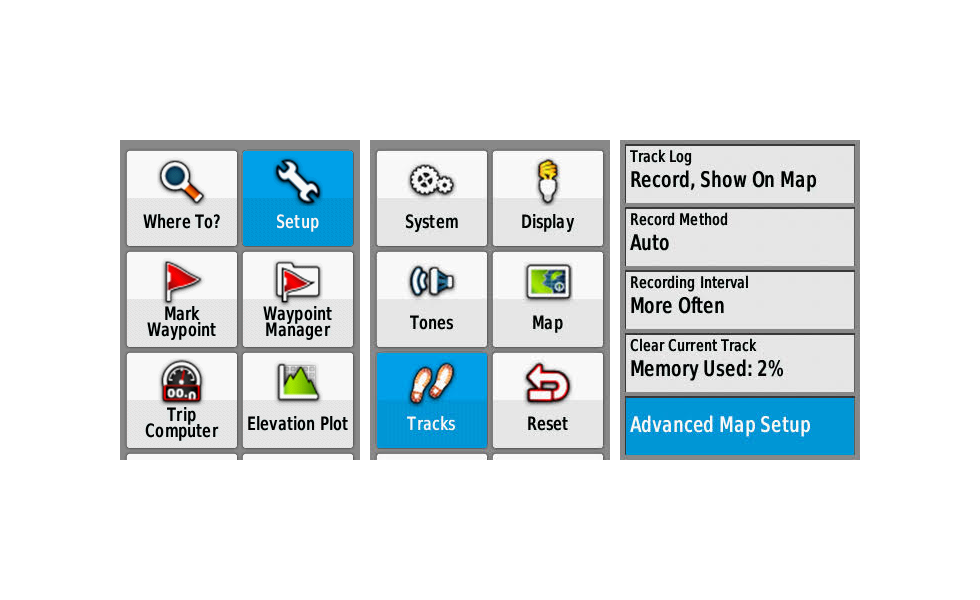
| 7. | Setup > Tracks > 'Advanced Map Setup' should be titled 'Advanced Track Setup' or 'Advanced Setup'. [example] [109] | [240] [250] [260] [270] [280] [290] |
| 8. |
Configure 'Setup > Routing' as shown below: [Gr]
Calculate Routes for: Pedestrian Lock On Road: No Off Road Transitions: Auto Avoidance Setup: Avoid Highways and Carpool Lanes, Do Not Avoid U-Turns, Toll Roads and Unpaved Roads 2. Hold Menu Button to open 'Where To?' page 3. Select 'Waypoints' and choose a waypoint 3. Select 'Go' 4. Select 'On Road for Time' 5. Wait for route to be fully calculated and displayed on Map page 6. Recheck 'Setup > Routing > Avoidance Setup' and find 'Lock On Road = No' 7. Hold Menu Button to open 'Where To?' page 8. Select 'Stop Navigation' 9. Hold Menu Button to open 'Where To?' page 10. Select 'Waypoints' and choose a different waypoint 11. Select 'Go' 12. Select 'On Road for Time' 13. Wait for route to be fully calculated and displayed on Map page 14. Recheck 'Setup > Routing > Avoidance Setup' and find 'Lock On Road = Yes' | [280] [290] |
| 9. | Map page rendering speed of eTrex x2x is substantially slower than previous models. [video] [Gr] | [240] [250] [260] [270] [280] [290] |
| 1. | Satellite Page incorrectly identifies GLONASS satellites. [example] | [270] [280] [290] |
| 2. | Satellite Page incorrectly indicates SBAS correction data is being applied to GLONASS satellites. [example] | [270] [280] [290] |
| 3. | Geocache Filters are not honored in Map Page display. | [270] [280] [290] |
| 4. | Multiple users have reported they are unable to safely eject a microSD card installed in an eTrex x2x. [Gr] [81] | [270] [280] [290] |
| 5. | Keyboard language selection is not retained across power cycles. | [270] [280] [290] |
| 6. | The 'Back' button is non functional when prompted to select guidance method for route calculation. [Gr] | [270] [280] [290] |
| 7. | Setup > Tracks > 'Advanced Map Setup' should be titled 'Advanced Track Setup' or 'Advanced Setup'. [example] [109] | [270] [280] [290] |
| 8. |
Configure 'Setup > Routing' as shown below: [Gr]
Calculate Routes for: Pedestrian Lock On Road: No Off Road Transitions: Auto Avoidance Setup: Avoid Highways and Carpool Lanes, Do Not Avoid U-Turns, Toll Roads and Unpaved Roads 2. Hold Menu Button to open 'Where To?' page 3. Select 'Waypoints' and choose a waypoint 3. Select 'Go' 4. Select 'On Road for Time' 5. Wait for route to be fully calculated and displayed on Map page 6. Recheck 'Setup > Routing > Avoidance Setup' and find 'Lock On Road = No' 7. Hold Menu Button to open 'Where To?' page 8. Select 'Stop Navigation' 9. Hold Menu Button to open 'Where To?' page 10. Select 'Waypoints' and choose a different waypoint 11. Select 'Go' 12. Select 'On Road for Time' 13. Wait for route to be fully calculated and displayed on Map page 14. Recheck 'Setup > Routing > Avoidance Setup' and find 'Lock On Road = Yes' |
[280] [290] |
| 9. | Map page rendering speed of eTrex x2x is substantially slower than previous models. [video] [Gr] | [270] [280] [290] |
| 1. |
| 1. |
| 1. |
| 1. |
| 1. | Please improve child waypoint management within the Geocaching User Interface, providing direct access to child waypoints for the active geocache, similar to the Monterra. |
| 1. | The Elevation Plot application currently allows the user to view 'Elevation/Time', 'Elevation/Distance', 'Barometric Pressure', or 'Ambient Pressure' data. Please include option to view 'Temperature', 'Heart Rate', 'Cadence', 'Calories' and other data, when available. [Gr] | |
| 2. | Please add an option allowing the user to configure the total number of geocaches used to populate the Geocache List. | |
| 3. | Please include an option to enable/disable the Barometric Altimeter (similar to Montana 7x0). | |
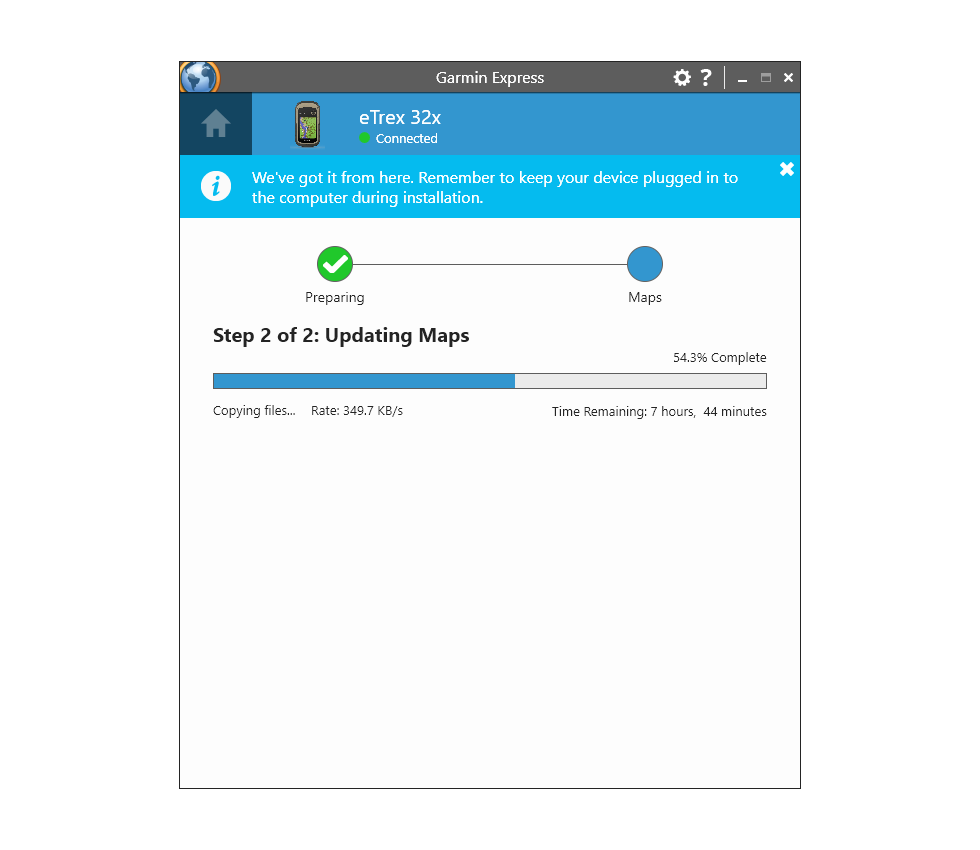
| 4. | Please improve Map Update speed. Requiring 10+ hours to install a single map is rediculous. [example] |